
FAQ — Questions
It needs to be in a https//: formatScarlett Aden wrote: 27 May 2020, 11:43 I know this seems silly, but when I try to insert an image, it doesn't show up?...how can you make the image actually appear? Thank you
There are some people have have done tutorials on this. You can use flickr or imgur
you just need to make sure at the end of the link it says .jng or anything else associated with a picture. On flickr is would have lots of letters around two different links in a <(letters and links)>. Just delete the random letters until you are left with two links that start with https://. to get this link you have to press the little arrow at the bottom of the photo area and go to embedded. copy that.
there will be one that ends with .jpg. delete the other one and put the codes around the link. it will work. Some pictures may come out a bit small.
A different way is to go to google and search for an image. Do no download it. Click on the picture (on computer) and it will go to a black screen with the photo. Copy the link and put it inbetween the codes.
On phone, press and hold the photo it should say cody photo link or something like that. Just paste into the codes.
It would look like this [img(link)[/img]
this is how it will come out as
I hope this helped
|| Charmer || Statistically Relevant ||
|| Stamina - 5 || Evasion - 6 || Strength - 11 || Wisdom - 7 || Arcane Power - 6 || Accuracy - 7 ||
|| Stamina - 5 || Evasion - 6 || Strength - 11 || Wisdom - 7 || Arcane Power - 6 || Accuracy - 7 ||


FAQ — Questions
@Scarlett Aden
Hello, your picture isn’t working for me. I believe the reason why is that it does not end in a picture format such as .jpeg or .png or gif format for .gif. Your link is a super long one from Google and we have had trouble with those before. Try hosting your image on imgur or tryimg.bb. They provide BBcode hosting options and have never failed for me.
Hello, your picture isn’t working for me. I believe the reason why is that it does not end in a picture format such as .jpeg or .png or gif format for .gif. Your link is a super long one from Google and we have had trouble with those before. Try hosting your image on imgur or tryimg.bb. They provide BBcode hosting options and have never failed for me.


FAQ — Questions
Hi there! Somebody may have asked this, but how do you link something into your words? Like when you click on words it will bring you to a thread etc. I need a response quite quickly because I need to submit a thread for an errand soon.
Thank you to anyone who can help!
Thank you to anyone who can help!
STA: 6 EVA: 8 STR: 5 WIS: 9 AP: 5 ACC: 7
Sixth Sense | Prodigal Charms Learner
"mindset first, actions second.” -unknown
Sixth Sense | Prodigal Charms Learner
"mindset first, actions second.” -unknown

FAQ — Questions
@Nell Zoldak
Is This what you mean?
if so:
Is This what you mean?
if so:
Code: Select all
[url=site you want to link to here]Text you want as a link[/url]|| t r u n k ||
Stamina: 4 | Evasion: 6 | Strength: 4 | Wisdom: 4 | Arcane Power: 6 | Accuracy: 6
Stamina: 4 | Evasion: 6 | Strength: 4 | Wisdom: 4 | Arcane Power: 6 | Accuracy: 6
FAQ — Questions
Thank you so much! Your help is greatly appreciated.
STA: 6 EVA: 8 STR: 5 WIS: 9 AP: 5 ACC: 7
Sixth Sense | Prodigal Charms Learner
"mindset first, actions second.” -unknown
Sixth Sense | Prodigal Charms Learner
"mindset first, actions second.” -unknown
FAQ — Questions
@Nell Zoldak
No problem! In the future you can also click on the little button that looks like a chain (the one next to the anchor) and it will help you set up that code as well.
No problem! In the future you can also click on the little button that looks like a chain (the one next to the anchor) and it will help you set up that code as well.
|| t r u n k ||
Stamina: 4 | Evasion: 6 | Strength: 4 | Wisdom: 4 | Arcane Power: 6 | Accuracy: 6
Stamina: 4 | Evasion: 6 | Strength: 4 | Wisdom: 4 | Arcane Power: 6 | Accuracy: 6

FAQ — Questions
@Scarlett Aden the link you had posted that was flanked in img tags was not an image link. That was a google search link. Specifically this
To get an image, like the one that is showing up as the first pick, you need to get that IMAGE LINK. Right click on a windows computer the image you desire and pick on the drop down "copy image link" to put that image link in your clipboard.
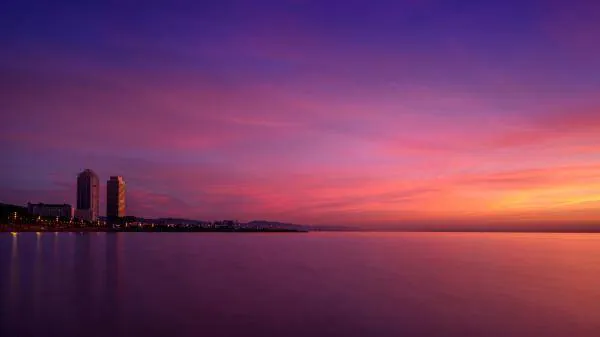
That link when flanked in image tags `img` would give you the sunset you want.
To get an image, like the one that is showing up as the first pick, you need to get that IMAGE LINK. Right click on a windows computer the image you desire and pick on the drop down "copy image link" to put that image link in your clipboard.
That link when flanked in image tags `img` would give you the sunset you want.
Code: Select all
[img]/images/upload/x8s2clkgx0si.webp[/img]There is something about ambition, how it not only propels you but also defines you.