
Forum Suggestions
No, like check the image attached. So, I can see that there are new messages in Site information. But I don't want to know when there is a new message in for example FAQ or Technical Support, so I don't allow them to show notifications while the others like Announcement Board.Nick Jameson wrote: 4 Aug 2026, 19:33You don’t get notified of new posts if you click the bell icon so it is hollow and to see new posts go to preferences and change show unread messages in crest menu to yesAaron Schwartz wrote: 4 Aug 2026, 19:29 So, just like we can set a channel to send us a notification if there is a new post, or something similar when we do it for a thread (sends a notification for each post), can there be a reverse option where we can like mute forums? Similar to muting discord channels where the channel is visible, but it doesn't show if it has new notifications or not.
The reason I am asking so is like I want to see if there are new messages in site updates or announcement board but don't want to get a notification for either of them, so can like mute FAQ, Technical Support and Staff Request so that when I am checking the different channels, I see that ok, there's a new message in site information that means it is in announcement board or another channel I didn't set to mute.
In short, something like muting a channel on discord.
Reducio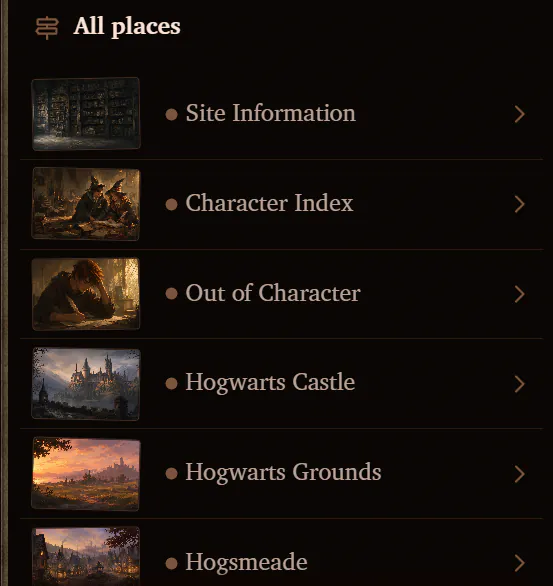
Aaron Schwartz
Wit beyond measure is man's greatest treasure.

Forum Suggestions
I don’t understand what you mean but if you only want to know about certain forums subscribe to those forums so you will get pinged when there is a post there and you can easily see wether it is those ones that have posts on or the other onesAaron Schwartz wrote: 4 Aug 2026, 19:44No, like check the image attached. So, I can see that there are new messages in Site information. But I don't want to know when there is a new message in for example FAQ or Technical Support, so I don't allow them to show notifications while the others like Announcement Board.Nick Jameson wrote: 4 Aug 2026, 19:33You don’t get notified of new posts if you click the bell icon so it is hollow and to see new posts go to preferences and change show unread messages in crest menu to yesAaron Schwartz wrote: 4 Aug 2026, 19:29 So, just like we can set a channel to send us a notification if there is a new post, or something similar when we do it for a thread (sends a notification for each post), can there be a reverse option where we can like mute forums? Similar to muting discord channels where the channel is visible, but it doesn't show if it has new notifications or not.
The reason I am asking so is like I want to see if there are new messages in site updates or announcement board but don't want to get a notification for either of them, so can like mute FAQ, Technical Support and Staff Request so that when I am checking the different channels, I see that ok, there's a new message in site information that means it is in announcement board or another channel I didn't set to mute.
In short, something like muting a channel on discord.
Reducio

Forum Suggestions
Hmm, you meant the dot that appeared beside the places when it show there's a new post?Aaron Schwartz wrote: 4 Aug 2026, 19:44No, like check the image attached. So, I can see that there are new messages in Site information. But I don't want to know when there is a new message in for example FAQ or Technical Support, so I don't allow them to show notifications while the others like Announcement Board.Nick Jameson wrote: 4 Aug 2026, 19:33You don’t get notified of new posts if you click the bell icon so it is hollow and to see new posts go to preferences and change show unread messages in crest menu to yesAaron Schwartz wrote: 4 Aug 2026, 19:29 So, just like we can set a channel to send us a notification if there is a new post, or something similar when we do it for a thread (sends a notification for each post), can there be a reverse option where we can like mute forums? Similar to muting discord channels where the channel is visible, but it doesn't show if it has new notifications or not.
The reason I am asking so is like I want to see if there are new messages in site updates or announcement board but don't want to get a notification for either of them, so can like mute FAQ, Technical Support and Staff Request so that when I am checking the different channels, I see that ok, there's a new message in site information that means it is in announcement board or another channel I didn't set to mute.
In short, something like muting a channel on discord.
Reducio
If yes, I think Zach added that setting set on preference that turned off all the notifications so you're not gonna see any dot notifs whatsoever. However, when you turned off that setting, there's no exception with the place you wanted see unless you subscrised it (that will get you the notif through the remembrall).
So when you turned on the setting, the dot notifs appears almost everywhere...
give me a lemon and I'll makes us some lemonades
-join if u like pls-
-join if u like pls-
Forum Suggestions
Yeah, but I was wondering if it could be made to be selective perhaps?Millie Ann wrote: 4 Aug 2026, 20:12Hmm, you meant the dot that appeared beside the places when it show there's a new post?Aaron Schwartz wrote: 4 Aug 2026, 19:44No, like check the image attached. So, I can see that there are new messages in Site information. But I don't want to know when there is a new message in for example FAQ or Technical Support, so I don't allow them to show notifications while the others like Announcement Board.Nick Jameson wrote: 4 Aug 2026, 19:33You don’t get notified of new posts if you click the bell icon so it is hollow and to see new posts go to preferences and change show unread messages in crest menu to yesAaron Schwartz wrote: 4 Aug 2026, 19:29 So, just like we can set a channel to send us a notification if there is a new post, or something similar when we do it for a thread (sends a notification for each post), can there be a reverse option where we can like mute forums? Similar to muting discord channels where the channel is visible, but it doesn't show if it has new notifications or not.
The reason I am asking so is like I want to see if there are new messages in site updates or announcement board but don't want to get a notification for either of them, so can like mute FAQ, Technical Support and Staff Request so that when I am checking the different channels, I see that ok, there's a new message in site information that means it is in announcement board or another channel I didn't set to mute.
In short, something like muting a channel on discord.
Reducio
If yes, I think Zach added that setting set on preference that turned off all the notifications so you're not gonna see any dot notifs whatsoever. However, when you turned off that setting, there's no exception with the place you wanted see unless you subscrised it (that will get you the notif through the remembrall).
So when you turned on the setting, the dot notifs appears almost everywhere...
Aaron Schwartz
Wit beyond measure is man's greatest treasure.
Forum Suggestions
This would require a lot of coding by zach so I’d recommend posting this in code related feedback the link is on the first post here so zach can look at your suggestionAaron Schwartz wrote: 4 Aug 2026, 20:23Yeah, but I was wondering if it could be made to be selective perhaps?Millie Ann wrote: 4 Aug 2026, 20:12Hmm, you meant the dot that appeared beside the places when it show there's a new post?Aaron Schwartz wrote: 4 Aug 2026, 19:44No, like check the image attached. So, I can see that there are new messages in Site information. But I don't want to know when there is a new message in for example FAQ or Technical Support, so I don't allow them to show notifications while the others like Announcement Board.Nick Jameson wrote: 4 Aug 2026, 19:33You don’t get notified of new posts if you click the bell icon so it is hollow and to see new posts go to preferences and change show unread messages in crest menu to yesAaron Schwartz wrote: 4 Aug 2026, 19:29 So, just like we can set a channel to send us a notification if there is a new post, or something similar when we do it for a thread (sends a notification for each post), can there be a reverse option where we can like mute forums? Similar to muting discord channels where the channel is visible, but it doesn't show if it has new notifications or not.
The reason I am asking so is like I want to see if there are new messages in site updates or announcement board but don't want to get a notification for either of them, so can like mute FAQ, Technical Support and Staff Request so that when I am checking the different channels, I see that ok, there's a new message in site information that means it is in announcement board or another channel I didn't set to mute.
In short, something like muting a channel on discord.
Reducio
If yes, I think Zach added that setting set on preference that turned off all the notifications so you're not gonna see any dot notifs whatsoever. However, when you turned off that setting, there's no exception with the place you wanted see unless you subscrised it (that will get you the notif through the remembrall).
So when you turned on the setting, the dot notifs appears almost everywhere...
Forum Suggestions
Ah, didn't know that. Will do. Thanks!Nick Jameson wrote: 4 Aug 2026, 20:30This would require a lot of coding by zach so I’d recommend posting this in code related feedback the link is on the first post here so zach can look at your suggestionAaron Schwartz wrote: 4 Aug 2026, 20:23Yeah, but I was wondering if it could be made to be selective perhaps?Millie Ann wrote: 4 Aug 2026, 20:12Hmm, you meant the dot that appeared beside the places when it show there's a new post?Aaron Schwartz wrote: 4 Aug 2026, 19:44No, like check the image attached. So, I can see that there are new messages in Site information. But I don't want to know when there is a new message in for example FAQ or Technical Support, so I don't allow them to show notifications while the others like Announcement Board.Nick Jameson wrote: 4 Aug 2026, 19:33
You don’t get notified of new posts if you click the bell icon so it is hollow and to see new posts go to preferences and change show unread messages in crest menu to yes
Reducio
If yes, I think Zach added that setting set on preference that turned off all the notifications so you're not gonna see any dot notifs whatsoever. However, when you turned off that setting, there's no exception with the place you wanted see unless you subscrised it (that will get you the notif through the remembrall).
So when you turned on the setting, the dot notifs appears almost everywhere...
Aaron Schwartz
Wit beyond measure is man's greatest treasure.

Forum Suggestions
I have noticed that there is rarely any Errands available. Wondered if more regular ones could potentially be added?
Only one other thing. Maybe a notification to tell you to collect your daily money in the common rooms, as I always forget…
Thank you!
Only one other thing. Maybe a notification to tell you to collect your daily money in the common rooms, as I always forget…
Thank you!

Forum Suggestions
They are created, moderated and checked by staff to ensure (1) no ai is used if the errand is writing or specifies no ai. (2) people don't really like cleaning errands! so to come up with fun errands sometimes and match an appropriate reward to it might take them some time rather than to have something new every week.Nessarose Goldwins wrote: 1 Sep 2026, 22:53 I have noticed that there is rarely any Errands available. Wondered if more regular ones could potentially be added?
Only one other thing. Maybe a notification to tell you to collect your daily money in the common rooms, as I always forget…
Thank you!
I dont want to speak too much on the errand part but I think if you have suggestions regarding CODE RELATED STUFF- go here- viewtopic.php?t=15378 - it's not something our administrator or staff can do on a coding basis- and if you're talking about like a thread where people will post and ping you to collect your stipend- similar to how we have the bertie botts beans- maybe consider starting one.
But my suggestion is, if collecting that stipend is that important to you, write a note, leave your screen on the page that says 'collect your stipend' before you go to bed, etc, etc.
In loving memory of the greatest and kindest woman. I adore you, and I will miss you, Dolly. My heart breaks for you, for your family, and for the world. You can be with Carl now, as an upside. And I Will Always Love You.

Forum Suggestions
There are often not many errands during the summer for several reasons; for instance, summer camp is going on and we don't want to distract too much from the threads that summer camp organisers have worked so hard to prepare. Additionally, during the school year all users are at Hogwarts so it's very easy to create a thread that everyone would have access to - but during the summer characters are likely home with their families, so there wouldn't easily be a single place everyone could go to for an errand thread. We've had summer errands in the past but they are rarer, you're right.Nessarose Goldwins wrote: 1 Sep 2026, 22:53 I have noticed that there is rarely any Errands available. Wondered if more regular ones could potentially be added?
Only one other thing. Maybe a notification to tell you to collect your daily money in the common rooms, as I always forget…
Thank you!
However, now that the school year is starting up again, you'll see a few errands every month, usually at least one but often more. We do ask that you be patient with errand-running staff, though - staff have a lot on their plate already even before hosting errands, which are a lot of work on our end as well. If there are not many errands during a particular time, it usually means that staff members are busy IRL and are prioritising getting other site work done (so that the site can continue to run smoothly) over running an errand.