
Credits
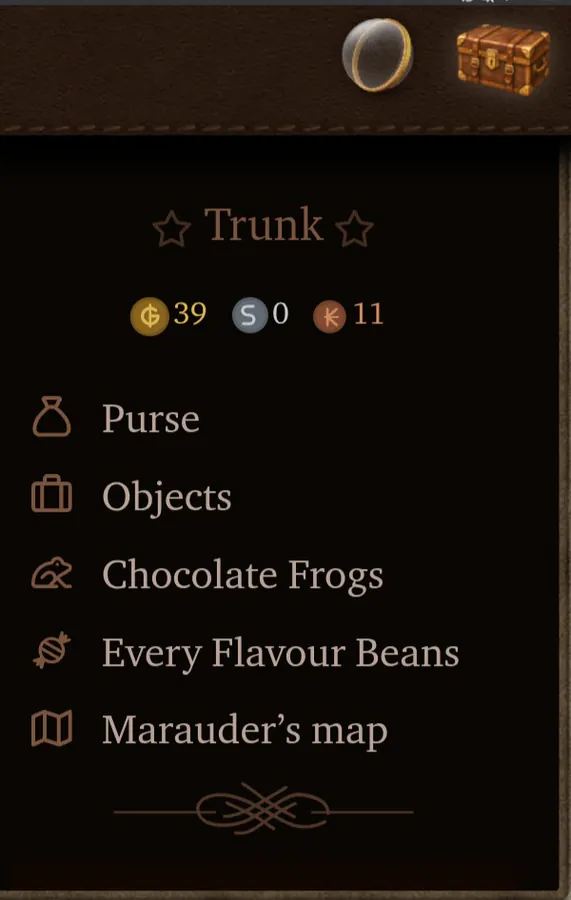
Tap the trunk image at the top right of your screen. It will display your money (we don’t have credits). Each golden one is a galleon (G), each silver one is a sickle (S) and each bronze one is a knut (K)
They appear in the following order left to right:
Galleons • Sickles • Knuts
They appear in the following order left to right:
Galleons • Sickles • Knuts

Credits
If you mean money, you can tap on the trunk icon in the top right of the screen and see how much money you have in your actual purse.Charlotte Kingston wrote: 29 Jul 2026, 15:48 How do I find out how many credits do I have? I want to buy a pet.

If you have any further questions, please don’t hesitate to owl me and I highly encourage you to join the Mentorship Program which will help you learn everything you want to know about the site and give you the best experience.

Be the change you wish to see |
||
in the world. |

Credits
Charlotte Kingston wrote: 29 Jul 2026, 15:48 How do I find out how many credits do I have? I want to buy a pet.
Hey Charlotte! You can find out much money, or credits, you have by clicking your trunk on the top bar where your profile picture (PFP) is located. There a drop-down will appear and you can click on Purse or see the little images of the galleons, sickles, and knuts. We just had an update where Zach, our site coder, made these adorable graphics that shows up how much money we have without going to the Purse tab. Hope this helps you !! oops Avery and Eugenia beat me