
17 Apr 2021, 23:13
Tags
How do I add tags to a Topic?
Last edited by Maximus Green on 17 Apr 2021, 23:24, edited 1 time in total.
"You can give a person knowledge, but you can't make them think. Some people want to remain fools, only because the truth requires change." -Tony A. Gaskins Jr.

17 Apr 2021, 23:17
Tags
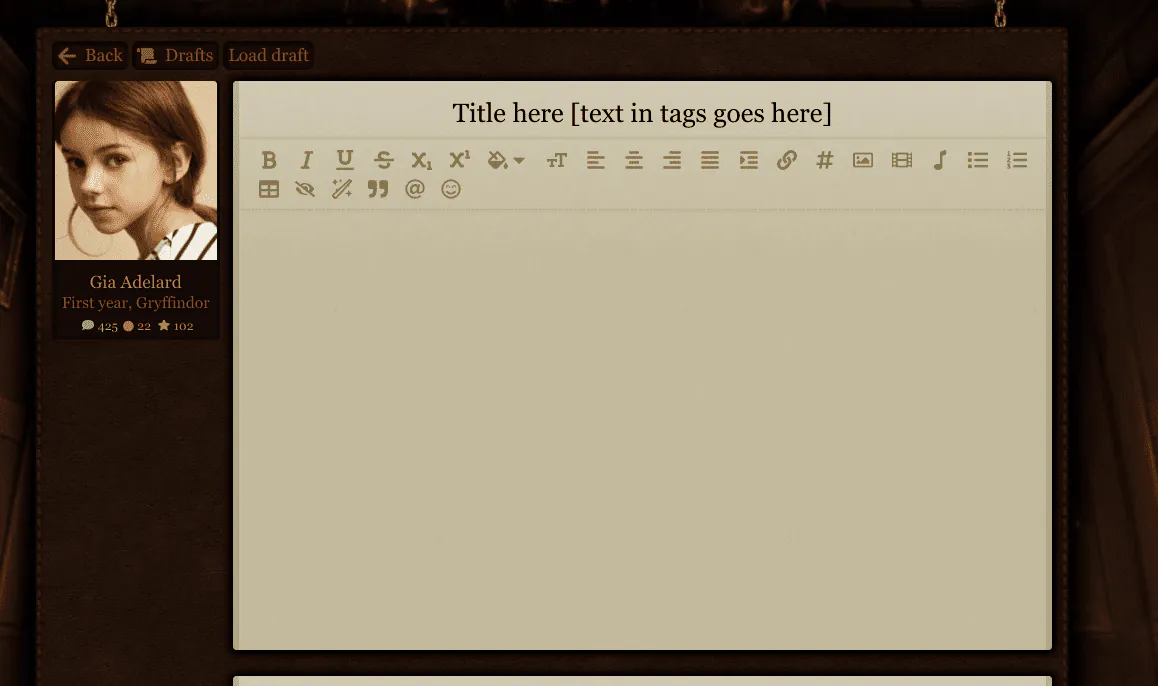
Use these square brackets "[]"s with the words you want inside it in your thread title. For instance, to have an open tag, you can have "[Open]". For a private tag, you can use "[Private]" or "[PV]" and so on. You can find out more information here.
This is my former staff account.
I also play: Serena Towers (Graduated PC), Arjan Oberoi (Graduated iNPC), Xiomara Torres (Current Student)
I also play: Serena Towers (Graduated PC), Arjan Oberoi (Graduated iNPC), Xiomara Torres (Current Student)

17 Apr 2021, 23:18
Tags
Hi Maximus! To add a tag (I'm assuming you mean the ones in the titles of topics) you just need to write out whatever you want to be in the tag between brackets in the title area. Hopefully this makes sense. . . if not, there's a screenshot below.
EDIT: Oops, Hjørdis answered before me. Oh well. The screenshot may be helpful though. . .

⋆ You were given this life because you are strong enough to live it⋆
Sta 8 ⋆ Eva 6 ⋆ Str 3 ⋆ Wis 7 ⋆ Arc 5 ⋆ Acc 6
Sta 8 ⋆ Eva 6 ⋆ Str 3 ⋆ Wis 7 ⋆ Arc 5 ⋆ Acc 6
17 Apr 2021, 23:24
Tags
Thanks.
"You can give a person knowledge, but you can't make them think. Some people want to remain fools, only because the truth requires change." -Tony A. Gaskins Jr.