
Boards on Menu not 'faded' anymore
Description of the problem :
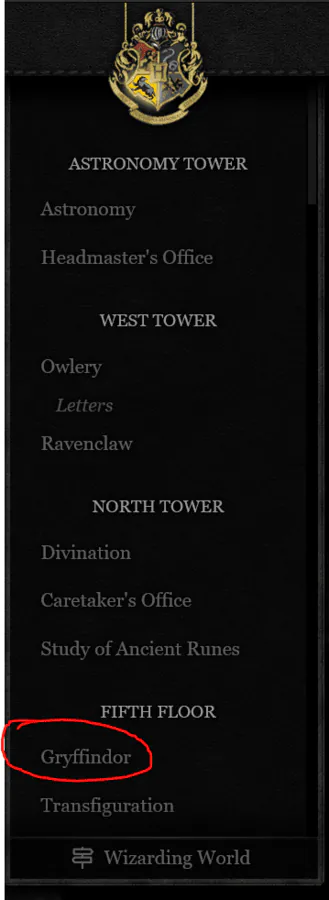
Areas that I could not access were previously "grayed" out, so it was obvious what areas could not be clicked. Now, they are the same as the others - which makes it a little confusing. I am worried that new players (who aren't aware that the area is inaccessible) will try and click it and nothing will happen and they'll get frustrated.
Right now, it looks the same as others but just cannot be clicked at all.
Screenshot :
For example, as a Hufflepuff, I do not have access to Gryffindor's common room. However, looking at the menu, the colour of "Gryffindor" is the same as all of the other boards (which I do have access to):
Is it possible to give this a faded colour again, so it's clear that this area cannot be accessed?
Error message :
No error message. It just cannot be clicked.
Device and browser used :
PC, Firefox.
PC: Serena Towers | iNPC: Arjan Oberoi | Other: Hjørdis Jensen & Xiomara Torres
Part-Goblin | Evasive Maneuvers | Beastmaster | Paragon of Health
Sta: 10 | Eva: 17 | Str: 3 | Wis: 15 | Arc Power: 10 | Acc: 15
Part-Goblin | Evasive Maneuvers | Beastmaster | Paragon of Health
Sta: 10 | Eva: 17 | Str: 3 | Wis: 15 | Arc Power: 10 | Acc: 15

Boards on Menu not 'faded' anymore
No idea why, and I couldn't see it... as I have a full access to everything 
... so thank you! It should be OK now.
... so thank you! It should be OK now.
Boards on Menu not 'faded' anymore
Perfect! It works now! Thank you!
PC: Serena Towers | iNPC: Arjan Oberoi | Other: Hjørdis Jensen & Xiomara Torres
Part-Goblin | Evasive Maneuvers | Beastmaster | Paragon of Health
Sta: 10 | Eva: 17 | Str: 3 | Wis: 15 | Arc Power: 10 | Acc: 15
Part-Goblin | Evasive Maneuvers | Beastmaster | Paragon of Health
Sta: 10 | Eva: 17 | Str: 3 | Wis: 15 | Arc Power: 10 | Acc: 15