
No "Delete All" Button for Drafts Page
Description of the problem :
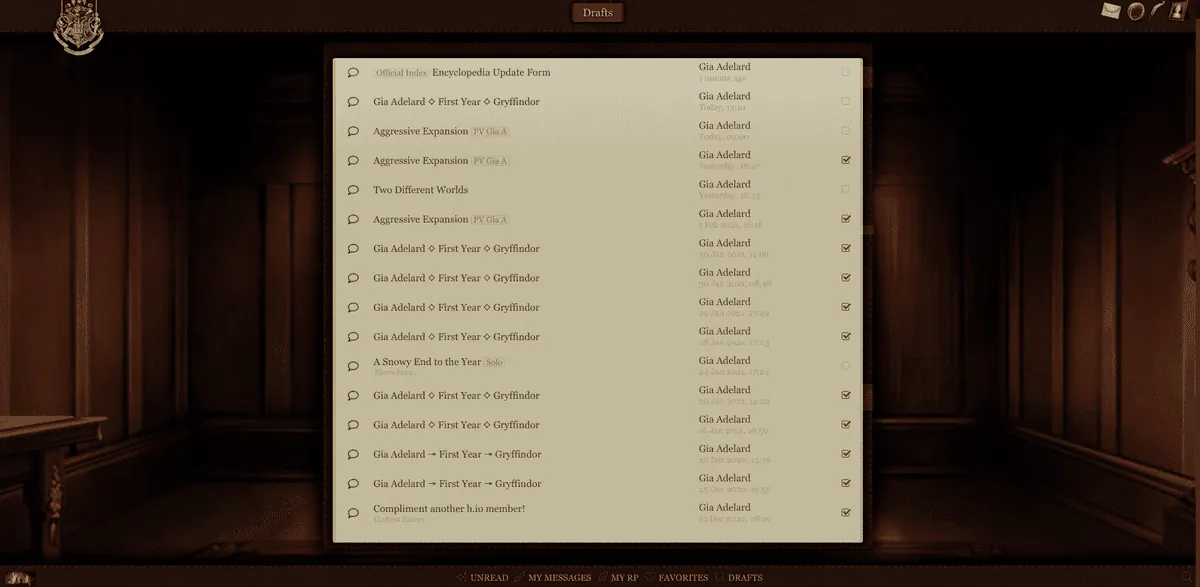
When I go to the Drafts page and select the ones I want to delete, there isn't a "delete all selected" button like there used to be. The selection buttons are all still there, and I can click on them and make them become checked off, but after that there's nothing I can do.
Screenshot : (You might need to zoom in a bit, the image is kind of small - and also, I zoomed my screen out so that the whole thing was visible.)
Error message :
None.
Device and browser used :
Device is a chromebook/computer and the browser I'm using is chrome.
⋆ You were given this life because you are strong enough to live it⋆
Sta 8 ⋆ Eva 6 ⋆ Str 3 ⋆ Wis 7 ⋆ Arc 5 ⋆ Acc 6
Sta 8 ⋆ Eva 6 ⋆ Str 3 ⋆ Wis 7 ⋆ Arc 5 ⋆ Acc 6

No "Delete All" Button for Drafts Page
It should be fixed! (the "select all" has been deleted while cleaning the code, but you can delete drafts by selecting them)